Customization
Overview
This guide outlines how to tailor the application to meet your operational needs, covering UI customizations, performance analytics, and additional configuration options.
Application Customization
User Interface
- Appearance Adjustments
- Update UI files and components to reflect your brand identity.
- Modify styling elements such as brand colors, typography, and layout configurations.
- Enhanced Search Capabilities
- Extend the sources component to support advanced search functionality using keywords, metadata, and Product IDs.
API & Data Sources
- API Integration
- Adjust and integrate API workflows with your custom data sources.
- Knowledge Base Updates
- Regularly revise the Sources file to include new or updated information.
- Align the knowledge base with current product data and ensure citations are accurate.
Performance Analytics & Reporting
- Data Utilization
- Leverage the AI Assistance component to drive data insights.
- Use the Insights and Feedback modules to develop and display performance metrics.
- Dashboards & Reports
- Configure dashboards to display key operational analytics and automated reports.
- Generate detailed, real-time visual reports to support data-driven decision-making.
- Consider saving AI-generated outputs to an external database for further analysis.
- Data Cross-Referencing
- Combine sentiment analysis with ticket numbers, operator names, and other identifiers for comprehensive insights.
- Data Anonymization
- Implement safeguards to protect sensitive data by replacing personal details (e.g., phone numbers, email addresses, credit card numbers) with clear placeholders like [phone_number], [email_address], and [credit_card_number].
Settings
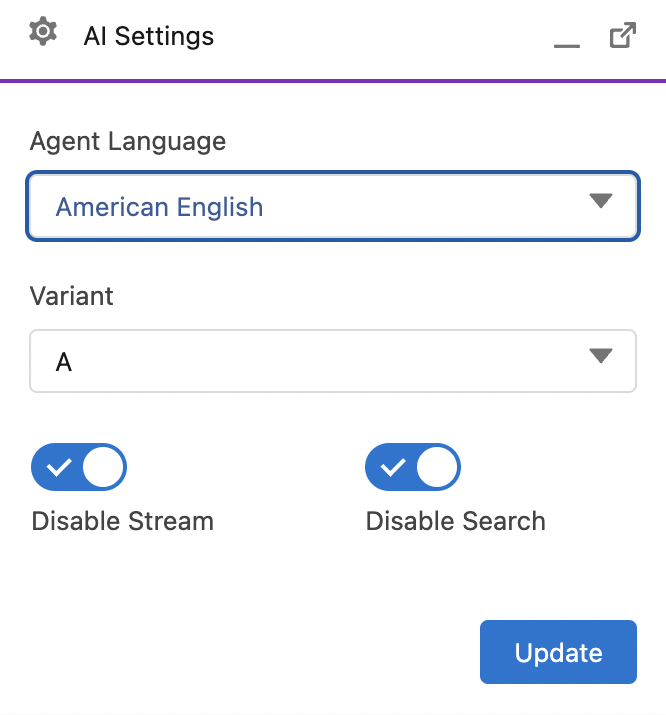
- Operators can change the language for AI interactions, which allows customization of translation features. Note: Settings for search and streaming are demo-only and should not be altered by operators.
Sessions
Currently, conversation responses are stored temporarily in the local storage for demonstration purposes. This means that if an operator reloads the page or closes the tab, the replies will not be persistent. To ensure persistence across sessions, you can implement one of the following approaches:
- Database Integration: Implement a server-side database (like MongoDB, PostgreSQL, or Firebase) to store conversation history with proper user authentication.
- Browser Extensions: Leverage browser technologies such as service workers and IndexedDB to maintain data persistence on the client side across sessions.